Skip to content

Learn Godotby playingit.

Open Derleniyo and pick a small task. You write the code; if it fails, Anteno points out where to look. Then you build the same idea by hand in a Godot scene.

INSIDE THE APP
In TurkishDesktopBeta
PLAYER.GDSAVED
extends Node

func move_player():
  velocity = direction * speed
  move_and_slide()
Run it and watch

We check what your code actually does

Take the scene with you

Correct. The signal now carries an argument.

Build the scene with your own hands

World

↳ Player

↳ Sprite

Name · Player

Parent · World

Visible · SAVED

Anteno
Anteno is there. The keyboard is still yours.
DOWNLOAD

Want to try it on your computer?

Grab the installer, sign in, and carry on where you left off. The beta currently runs on Windows desktop.

CURRENTLY ON WINDOWS

HOW IT WORKS · BETA

No watching from the sidelines.

Every topic asks you to make one small thing. Anteno stays nearby, but you still do the work.

RUN THE CODE · BETA

We check what your code actually does

You do not have to memorise and paste one line. Derleniyo runs the code on your device; if it works, a different valid solution can still pass.

The point is not to guess our answer. It is to make the code work.

PLAYER.GDPASSED
func move_player():
  velocity = direction * speed
  move_and_slide()

Good. The character moves.

Anteno
SEE THE SCREEN · BETA

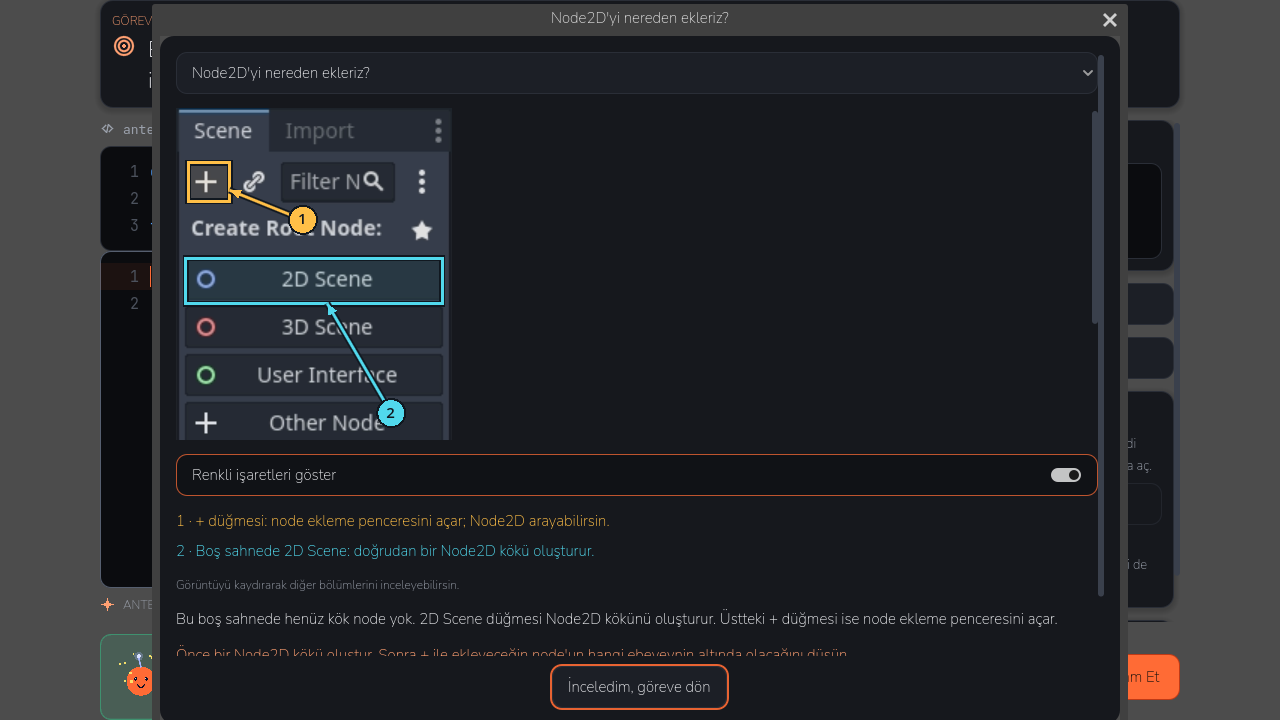
No guessing where to click in Godot

The real editor image beside the lesson marks the button, panel, or field you need.

Panel names do not float in the abstract; you see exactly where they are.

Annotated Godot editor guide inside Derleniyo
Anteno
The bit you need is here. You try the rest.

Jump in · Make something · Tell us where you got stuck

BETA

What we mean by beta:

The app works, but it still has rough edges. If an explanation is unclear or a screen makes you work too hard, we want to know.

Take another look inside the function.

Is the movement call in the right place?

I can be more specific if you want.

Anteno
BETA

When you get stuck, Anteno gives you a nudge

The first hint only points you in the right direction. Ask again and it gets more specific. The solution never drops onto the screen uninvited.

A wrong answer is not the end of the lesson. It is usually a clue.

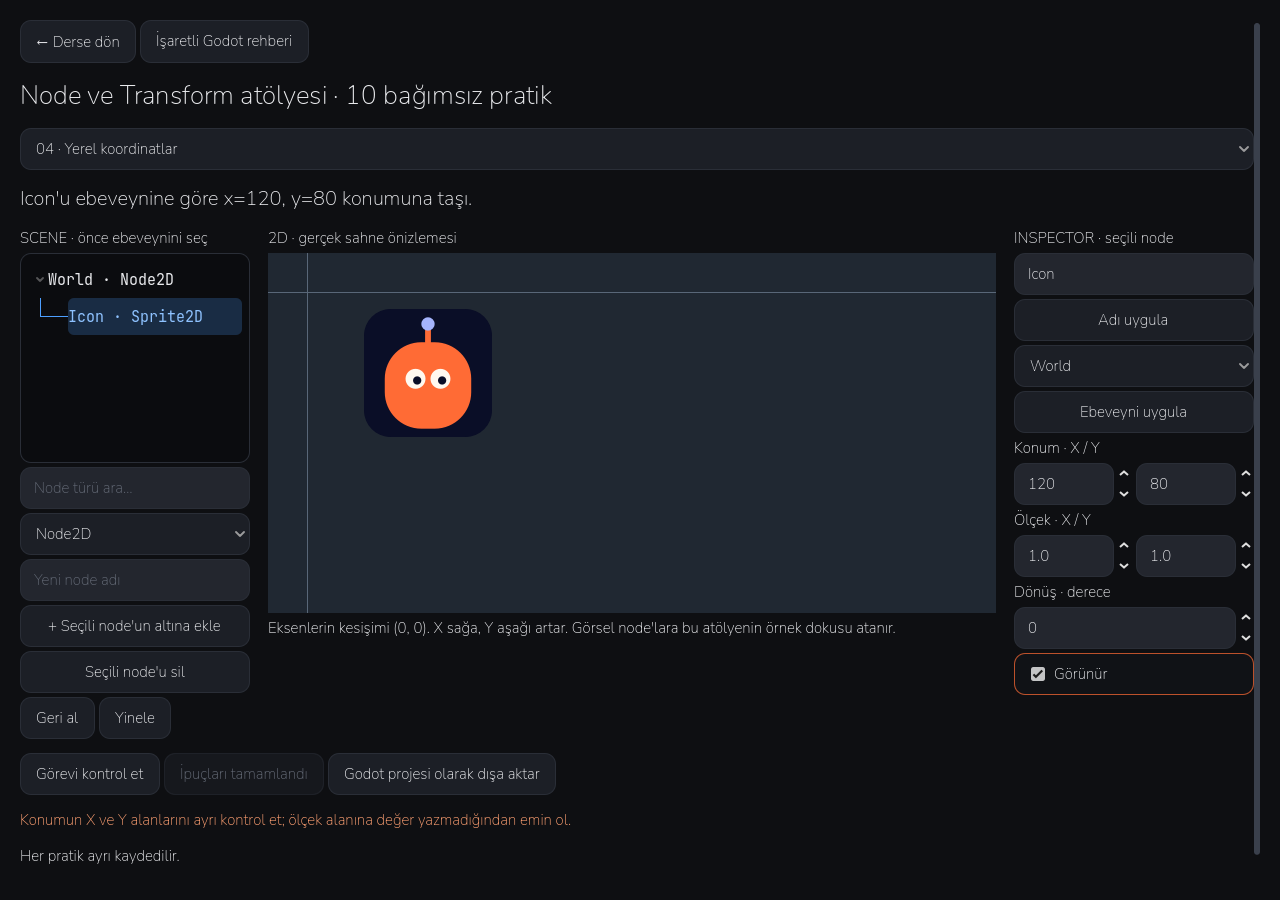
Derleniyo Node and Transform workspace
Anteno
Move it, rotate it, break it. Undo is right there.
BETA

Build the scene with your own hands

Add a node, rename it, and move it under another node. Play with position, scale, and rotation; undo it when it goes wrong.

This is not a video. It is a small Godot workbench you can poke at.

PROJECT READY

project.godot

main.tscn

icon.svg

Anteno
BETA

When you finish, the files are yours

Export the scene you made in the workshop as a real Godot project. The main scene and project settings come with it.

Download it, open it in Godot, and carry on as if it were your own project.

INSIDE THE APP · BETA

This is Derleniyo on the inside.

This is the part you can use now, not a list of things we may build later. Some edges are still rough. That is why it is a beta.

INSIDE DERLENIYO
Anteno

See what you are changing

Anteno marks the useful bit of the editor. You can ignore the rest of the buttons for now.

Anteno

Try something

Write the solution that makes sense to you. Different code can pass when it does the same job.

Anteno

Run it and watch

Derleniyo tries the code on your device. When something is wrong, Anteno points to the place worth checking first.

Anteno

Take the scene with you

Save what you made in the workshop. Export it as a Godot project and keep tinkering in the editor.

What you keep

We check what your code actually does

The point is not to guess our answer. It is to make the code work.

Build the scene with your own hands

This is not a video. It is a small Godot workbench you can poke at.

When you finish, the files are yours

Download it, open it in Godot, and carry on as if it were your own project.

CHECK
Your code is tried on your device
WHERE DO I CLICK?
Annotated real Godot screens
OUTPUT
A project file you can open in Godot
BETA

What we mean by beta:

The app works, but it still has rough edges. If an explanation is unclear or a screen makes you work too hard, we want to know.

In short: use it, get stuck, tell us.

BETA

The lessons and hints are in Turkish

BETA

Code checks and the scene workshop are ready to use

BETA

Some of what you see today may be better tomorrow

FREQUENTLY ASKED

Short answers.

Use the app as normal. If an explanation is unclear, a screen feels slow, or something breaks, tell us.